How to Get Selected for Free Shein Products – Full Guide!
Advertisements

See how the Free Trial Center is organized, from browsing eligible items and submitting requests to tracking selection results and completing product evaluations.
Independent informational content — This guide is based on publicly accessible information from Shein’s Free Trial Help Center. We are not affiliated with, sponsored by, or endorsed by Shein. Eligibility, availability, and selection conditions apply. Approval and receipt of an item are not guaranteed. Review the latest official conditions before participating.
The Free Trial Center includes several stages, and understanding each one can help clarify what happens before and after an application is submitted.
This walkthrough covers where qualifying products may be displayed, how users can submit a request, how results are monitored, and what may be required after selection. No step in the process guarantees approval.
1Find the Free Trial section
After signing in to your Shein account, go to your profile in the app → Other Services (or More Services) → Free Trial Center. On the website, the option may be available through the community or services sections.
Review the items currently listed once you enter the area. Products can be added or removed over time, so availability is not fixed.
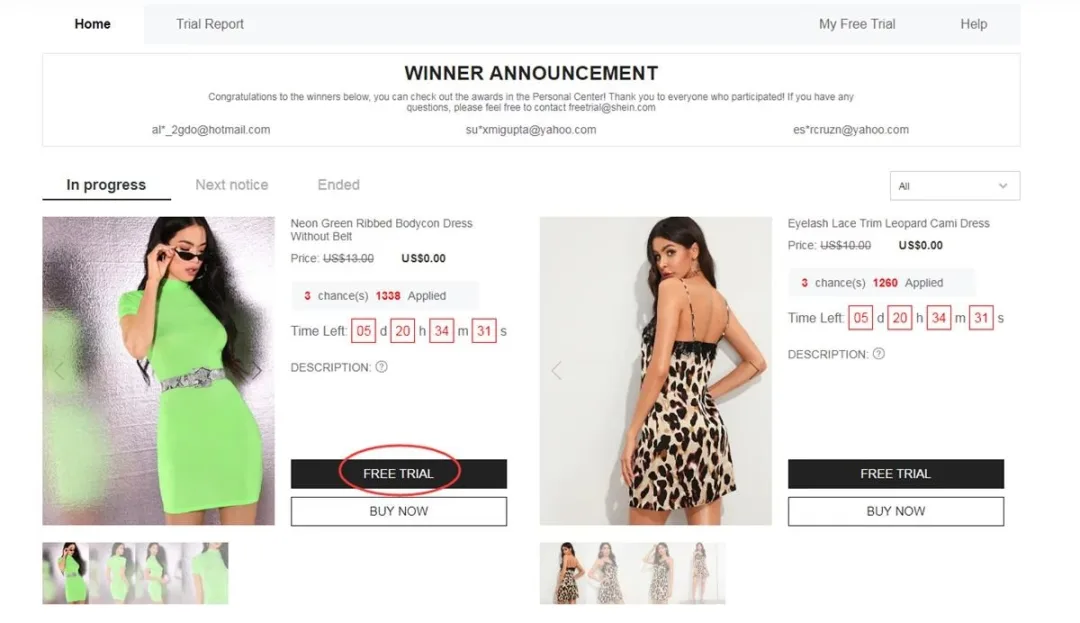
Example of the Free Trial navigation area
2Review a listing and submit a request
Users generally have up to 3 application opportunities per week. Opportunities that are not used typically expire rather than carrying over into the next week.
For an eligible product you would like to test:
- Choose the Free Trial option
- Select a size if the item requires one
- Confirm that your shipping address corresponds to the same country as the Shein site
- Review the request details and choose Submit
Regional information matters: The delivery-address country should correspond to the regional Shein website you are accessing. Different country information may affect request processing.
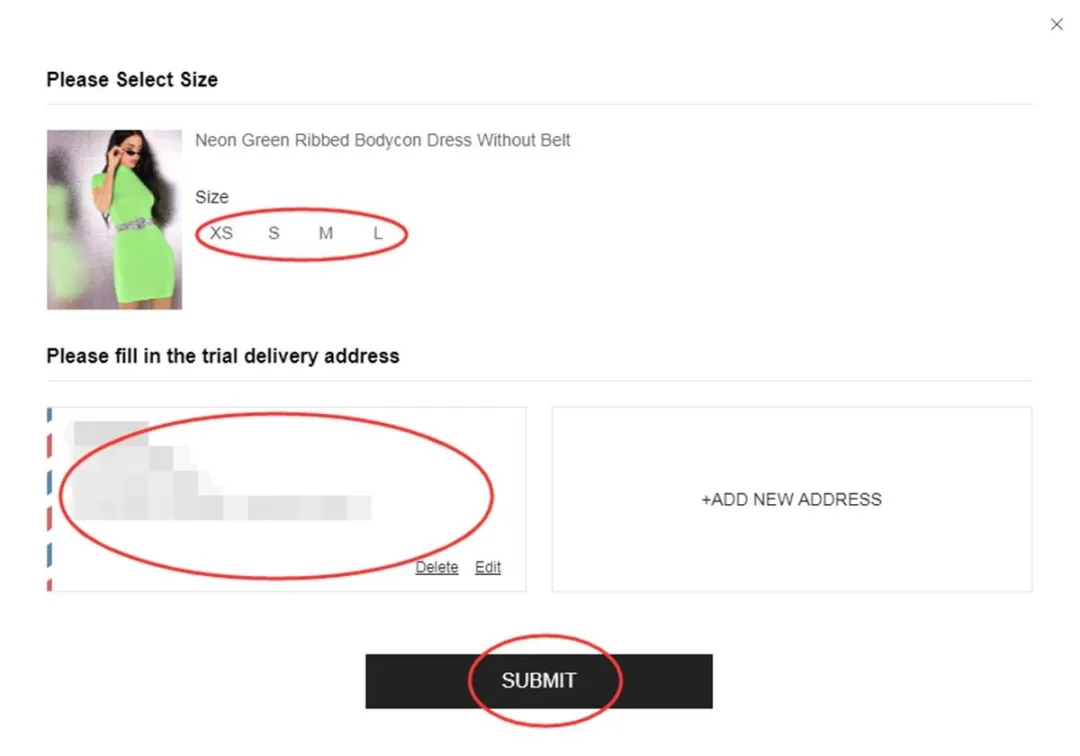
Example of the information reviewed before submitting a request
3Review the decision on your application
The status of an application may take around one week to update. Use My Free Trial or My Applications to review submitted requests.
- Approved — your application was selected. A qualifying order may then be generated at $0 and prepared for delivery.
- Failed — that specific request was not selected. You may review other eligible opportunities when available.
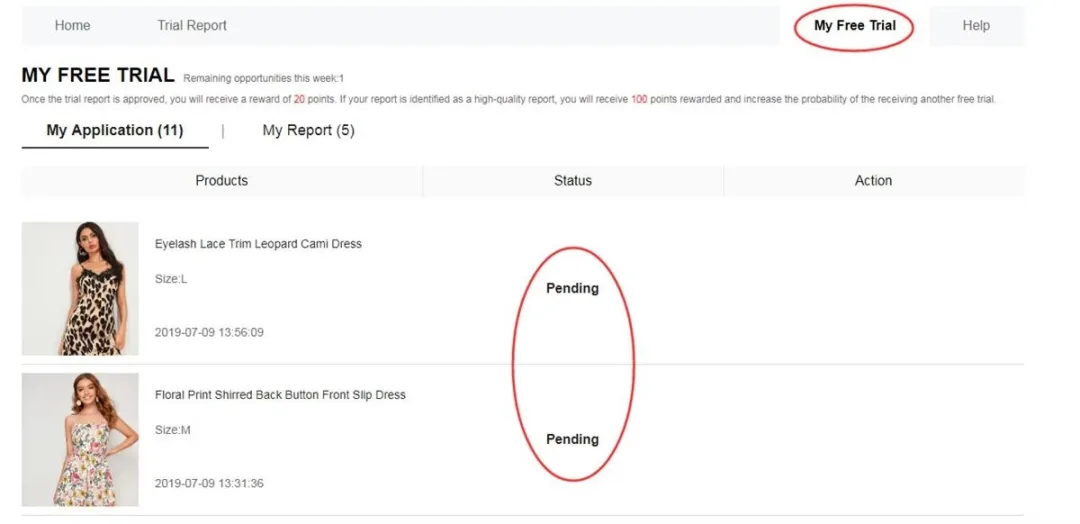
Example of the application-status area
4Use the product and complete the evaluation
When a selected participant receives an eligible item, it can be evaluated through normal use. Relevant points may include quality, fit, materials, comfort, design, and overall finish.
The participant can then submit detailed feedback through the account, preferably within 10 days of delivery. Evaluation activity may be visible under My Report.
A useful review can contain:
- Specific observations from actual product use
- Clear images showing the full item and relevant details
- Comments about materials, fit, comfort, construction, and overall experience
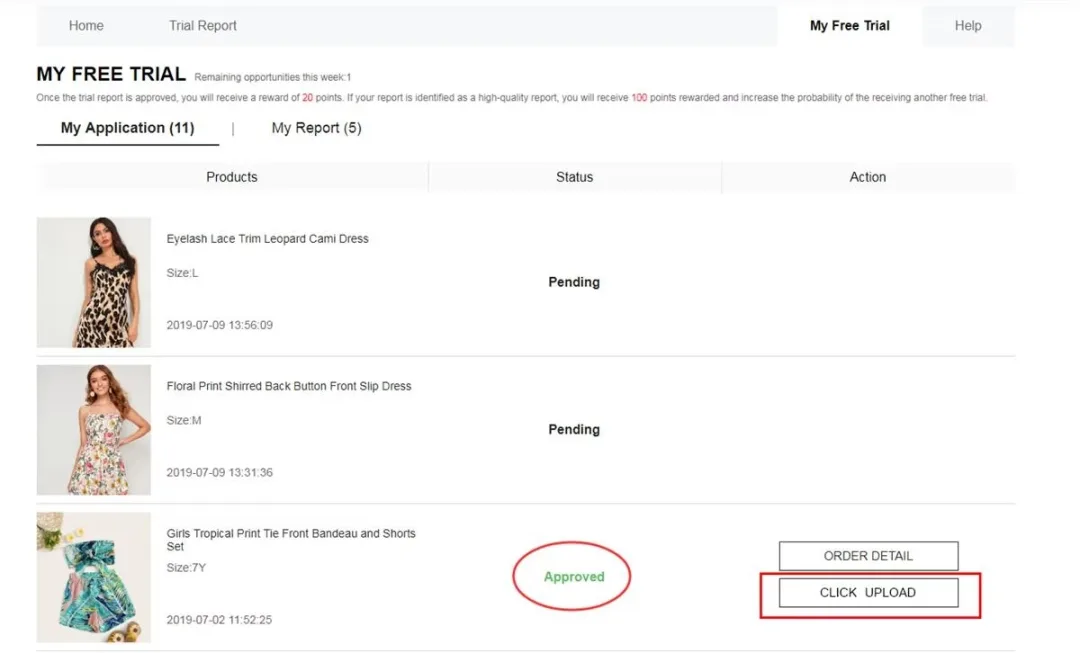
Example of the area used to provide an evaluation
Points details: An accepted report may provide approximately 20 points, while a qualifying Quality Report may provide around 100 additional points.
If the first evaluation is not accepted, the program may allow one additional attempt after corrections are made.
Key Free Trial conditions
• The program generally provides up to 3 applications each week
• Unused opportunities typically do not carry over
• Shipping-address country and regional website should correspond
• Shipping for qualifying products is generally covered, while customs or import charges may vary
• Required feedback should generally be completed within 10 days of delivery
• Duplicate or inaccurate accounts may result in restrictions
• Failing to complete a required review may affect later participation
Common application issues to avoid
❌ Leaving required account details incomplete
❌ Selecting an unsuitable product size
❌ Using delivery details from another regional market
❌ Expecting listings to remain unchanged
❌ Providing an overly brief review without useful images
❌ Missing the indicated evaluation period
❌ Creating additional accounts to submit more requests
Free Trial questions and answers
Is shipping normally included?Shipping is generally covered for qualifying Free Trial products, although customs duties or import-related fees may depend on the destination.
How many requests can be submitted weekly?The program generally provides up to three opportunities per week, and unused opportunities normally do not roll over.
What happens to a qualifying product after evaluation?Under the standard Free Trial process, selected participants can generally keep qualifying products after completing the required evaluation according to the applicable terms.
When can I expect an application update?A status update may take approximately one week. Check My Free Trial or My Applications for current information.
What if my report is not accepted?The program may offer one additional opportunity to correct and resubmit an initial report.
Is a large audience required to participate?A large social media following is not listed as a general requirement. Eligibility and genuine, useful product feedback are more relevant to participation.
The overall process can be summarized as: open the Free Trial Center → review eligible listings → submit requests within the weekly allowance → follow each application → if selected, receive and evaluate the item → complete the requested feedback. Understanding the applicable conditions can make each stage easier to follow.
Interested in reviewing the Free Trial Center?
See the products currently listed and review the applicable conditions before submitting an application. Selection and receipt of an item are not guaranteed.
GO TO FREE TRIAL CENTER NOWYou will be redirected to Shein’s official Free Trial Center.
Reference source: Shein Free Trial Help Center