Understanding Latency in Online Gaming: 2026 Technical Guide
Advertisements

Online gaming latency, often referred to as lag, is the delay between a player’s action and the game server’s response, significantly impacting gameplay and requiring strategic technical solutions for optimal performance.
Are you tired of your perfectly aimed shot missing its mark due to an unseen delay? Does your character seem to move a split second after you press a button? If so, you’re experiencing the frustrating reality of online gaming latency. In this 2026 technical guide, we’ll dive deep into what causes this digital drag and, more importantly, how to conquer it for a truly seamless online gaming experience.
The Fundamentals of Latency: What it is and Why it Matters
Latency, in the context of online gaming, refers to the time delay between when a player performs an action (like pressing a button) and when that action is registered by the game server. This delay is measured in milliseconds (ms) and is often referred to as ‘ping.’ A lower ping means a more responsive and fluid gaming experience, while a higher ping can lead to noticeable lag, desynchronization, and a significant disadvantage in competitive play. Understanding the core components that contribute to this delay is the first step toward mitigating it.
The journey of your data from your gaming device to the server and back involves multiple hops and processes. Each of these steps introduces a small amount of delay. When these delays accumulate, they become noticeable as latency. For instance, in a fast-paced first-person shooter, even a difference of 50ms can mean the difference between landing a headshot and being eliminated. This is why competitive gamers meticulously optimize every aspect of their network connection.
The Data Packet Journey
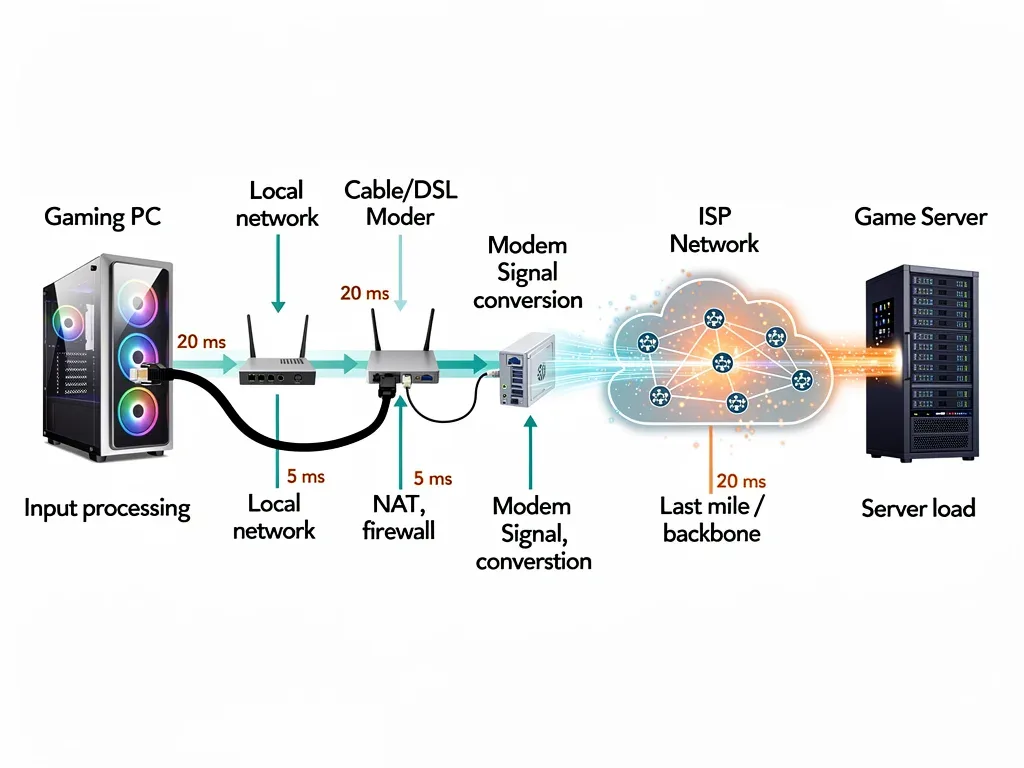
To grasp latency, visualize your commands as tiny data packets traveling across a vast network. These packets leave your device, traverse your local network, pass through your internet service provider (ISP), cross various internet backbone routers, and finally reach the game server. The server then processes your command, updates the game state, and sends data packets back to your device, reflecting the outcome.
- Local Network Delay: Time taken for data to travel within your home network (e.g., Wi-Fi, Ethernet).
- ISP Processing: Time your internet service provider takes to route your data.
- Internet Backbone Travel: The longest leg, where data crosses vast distances and multiple network nodes.
- Server Processing: Time the game server needs to interpret and respond to your input.
Each of these stages can introduce variables that increase latency. The physical distance to the game server is a primary factor, but network congestion, inefficient routing, and even server load can also play significant roles. Recognizing these stages allows for targeted troubleshooting and optimization efforts.
In essence, latency is the cumulative delay across this entire round trip. Minimizing it requires a holistic approach, addressing potential bottlenecks at every point in the data’s journey. From your home setup to the server infrastructure, every millisecond counts, especially in the rapidly evolving landscape of 2026 online gaming where precision and speed are paramount.
Identifying the Culprits: Common Causes of High Latency
High latency isn’t a singular issue but rather a symptom of various underlying problems. Pinpointing the exact cause is crucial for effective troubleshooting. Often, multiple factors combine to create a frustratingly laggy experience. We’ll explore the most common culprits, ranging from your local setup to broader internet infrastructure issues.
One of the most frequent causes is a suboptimal local network configuration. While many assume their internet speed is the sole determinant, internal network inefficiencies can be just as detrimental. Furthermore, the distance to the game server and the quality of the routing path your data takes are significant external factors.
Network Congestion and Bandwidth Saturation
When too many devices on your network are simultaneously consuming bandwidth, your gaming traffic can get throttled. Streaming 4K video, downloading large files, or even multiple users browsing can saturate your connection, leading to increased ping.
- Shared Bandwidth: Multiple devices competing for the same internet connection.
- Background Downloads: Operating system updates, game patches, or cloud backups running unnoticed.
- Streaming Services: High-definition video streaming consumes substantial bandwidth.
Similarly, congestion on your ISP’s network or the internet backbone itself can slow down data transmission. This is often outside your direct control but can be mitigated by choosing a reputable ISP and playing during off-peak hours.
Wireless vs. Wired Connections
Wi-Fi, while convenient, inherently introduces more latency and packet loss compared to a wired Ethernet connection. Wireless signals are susceptible to interference from other electronic devices, physical obstructions, and signal degradation over distance.
A direct Ethernet connection eliminates these variables, providing a more stable and faster path for your data. Even the latest Wi-Fi 6E and Wi-Fi 7 standards, while impressive, cannot entirely match the consistency of a physical cable for critical gaming scenarios. This is a fundamental principle that remains true even in 2026.
Geographic Distance to Game Servers
The further your physical location is from the game server, the longer it takes for data packets to travel, irrespective of your internet speed. This is a basic limitation of the speed of light and current fiber optic technology.
Choosing a a game server geographically closer to you is often the most impactful way to reduce baseline latency. Many modern games allow you to select your preferred server region or automatically connect you to the lowest ping server. Always check these options in your game settings.
Understanding these common causes empowers you to diagnose and address latency issues systematically. By methodically checking each potential problem area, you can significantly improve your online gaming experience.
Optimizing Your Local Network: First Line of Defense
Your local network is the first and most controllable point in the data’s journey to the game server. A well-optimized home network can drastically reduce latency and improve overall stability. This involves both hardware choices and configuration adjustments that are often overlooked by casual gamers.
Even with a blazing-fast internet connection, a poorly configured router or an unstable Wi-Fi signal can introduce unnecessary delays. Focusing on these local elements provides immediate and tangible improvements, laying a solid foundation for low-latency gaming.
Embrace the Ethernet Cable
This is arguably the most crucial step for reducing local network latency. Connect your gaming PC or console directly to your router using a high-quality Ethernet cable. This bypasses the inherent latency and potential interference of Wi-Fi.
Cat6 or Cat7 Ethernet cables are recommended for optimal performance, offering higher bandwidth and better shielding against interference. While Wi-Fi has advanced significantly, a wired connection provides unparalleled reliability and speed for gaming.
Router Configuration and Quality of Service (QoS)
Your router is the gateway to your internet. An old or low-end router might not be able to handle the demands of modern online gaming, especially with multiple devices connected. Investing in a gaming-grade router with advanced features can make a substantial difference.
- Upgrade Your Router: Newer routers offer better processing power and Wi-Fi standards (like Wi-Fi 6/6E/7) for improved local network performance.
- Enable QoS: Quality of Service settings allow you to prioritize gaming traffic over other network activities, ensuring your game gets the bandwidth it needs.
- Firmware Updates: Keep your router’s firmware updated to benefit from performance improvements and security patches.
Proper router placement is also vital if you must use Wi-Fi. Position it centrally, away from obstructions and other electronics that could cause interference. This maximizes signal strength and minimizes packet loss.
Minimizing Background Network Usage
Even with a fast connection, other applications and devices on your network can compete for bandwidth. Before a gaming session, close unnecessary programs, pause downloads, and ask others in your household to temporarily limit bandwidth-intensive activities.
Disabling automatic updates for games and operating systems can prevent unexpected bandwidth spikes during critical moments. Many operating systems and game launchers offer options to schedule updates outside of your peak gaming hours. This proactive management ensures your network is dedicated to your game when it matters most.
By diligently optimizing your local network, you create the most efficient pathway for your gaming data, significantly reducing the initial layers of latency before your connection even leaves your home.
ISP and Internet Infrastructure: Beyond Your Control, Yet Impactful
While your local network is within your immediate control, the performance of your internet service provider (ISP) and the broader internet infrastructure heavily influence your latency. Understanding these external factors helps in making informed decisions and managing expectations.
Even the best local setup can be hampered by a subpar ISP or an inefficient routing path. Knowing what to look for and how to communicate with your provider can be key to resolving persistent latency issues that originate outside your home.
Choosing the Right ISP and Connection Type
Not all internet connections are created equal when it comes to latency. Fiber optic connections generally offer the lowest latency due to the speed of light in fiber and dedicated bandwidth. Cable and DSL connections can be more susceptible to congestion and distance-related delays.
- Fiber Optic: Offers superior speed and significantly lower latency.
- Cable Internet: Good speeds, but shared bandwidth can lead to congestion during peak hours.
- DSL: Generally higher latency and lower speeds, less ideal for competitive gaming.
- Satellite Internet: Very high latency due to the immense distances data must travel to space and back, unsuitable for online gaming.
Research ISPs in your area and compare their reported latency statistics, not just download speeds. A higher download speed doesn’t automatically equate to lower latency.
Monitoring Your Route to Game Servers (Traceroute)
Your data doesn’t travel directly to the game server; it hops through many intermediate routers. A ‘traceroute’ command can show you the path your data takes and identify potential bottlenecks or problematic nodes along the way. High ping spikes at specific hops can indicate an issue with your ISP’s routing or an overloaded intermediate server.
If you consistently see high latency on specific hops that aren’t the game server itself, you can provide this information to your ISP. While they may not always be able to reroute your traffic, it gives them valuable data to investigate potential network issues on their end. Using a reliable VPN specifically designed for gaming can sometimes help by routing your traffic through a more optimized path, though this isn’t always guaranteed to reduce latency and can sometimes increase it.
ISP Throttling and Peering Agreements
Some ISPs may intentionally throttle certain types of traffic or have less efficient peering agreements with other network providers. This can lead to slower connections to specific game servers, especially if those servers are hosted on networks with poor peering relationships with your ISP.
While difficult to prove, consistent high latency to specific game servers, even when your overall internet speed is good, might suggest such issues. In these cases, contacting your ISP and providing detailed evidence (like traceroute results) is your best course of action. Sometimes, switching ISPs might be the only viable solution if these problems persist.
Understanding the interplay between your ISP and the wider internet infrastructure is crucial. It allows you to advocate for better service and identify issues that are beyond your immediate technical control, guiding you toward more effective long-term solutions.
Advanced Hardware and Software Solutions for 2026 Gaming
As online gaming evolves, so do the tools and technologies available to combat latency. Beyond basic network optimization, several advanced hardware and software solutions are emerging or becoming more refined by 2026, offering competitive advantages for serious gamers.
These solutions often involve specialized equipment or intelligent software that actively works to reduce ping and stabilize your connection. While some require investment, the performance gains can be significant for those seeking the absolute lowest latency.
Gaming Routers with Advanced Features
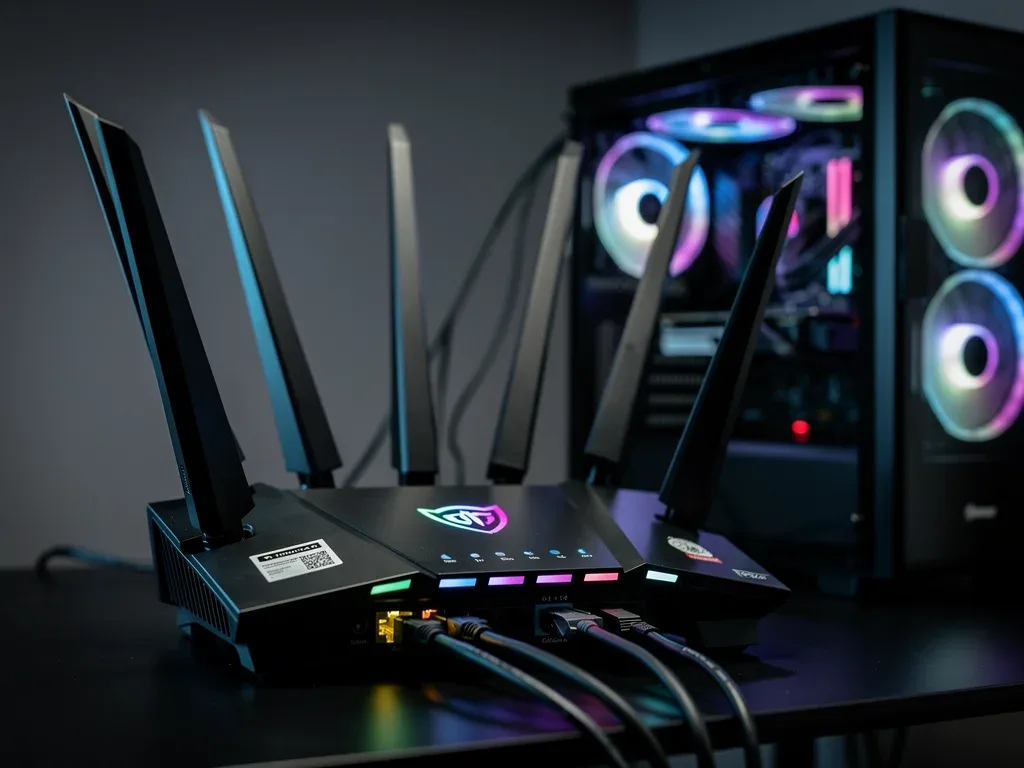
Modern gaming routers are specifically designed to prioritize gaming traffic and minimize latency. They often come equipped with powerful processors, ample RAM, and features like adaptive QoS, dedicated gaming ports, and even built-in VPN client support.
- Dedicated Gaming Ports: Some routers have ports that automatically prioritize traffic from connected gaming devices.
- Adaptive QoS: Intelligently allocates bandwidth to gaming based on real-time network conditions.
- Geo-Filtering: Allows you to connect to game servers within a specific geographic range to minimize distance-related latency.
These routers often feature user-friendly interfaces that make it easier to configure complex network settings, even for less tech-savvy users. They are an essential investment for competitive players.
Network Adapters and Drivers
While often overlooked, your network adapter (Ethernet card) and its drivers play a role in how efficiently your device communicates with the network. Ensure you have the latest drivers installed for your network adapter, as manufacturers frequently release updates that improve performance and stability.
For high-end gaming PCs, consider a dedicated PCIe network card from reputable brands like Killer Networking or Intel. These cards often feature optimized hardware and software designed to reduce latency and improve packet processing, offering a slight edge over integrated motherboard solutions.
Latency Reduction Software and Services
A growing number of software solutions and services aim to reduce latency by optimizing your data’s route to game servers. These often act as intelligent VPNs, selecting the most efficient path for your gaming traffic.
Services like WTFast or ExitLag use proprietary routing algorithms to bypass congested network segments, potentially reducing ping by intelligently rerouting your connection. While not a magic bullet, they can be effective for players experiencing routing issues with their ISP or connecting to distant servers. Always test these services thoroughly, as results can vary.
By leveraging these advanced hardware and software solutions, gamers in 2026 have more tools than ever to fine-tune their connections, ensuring their gameplay is as responsive and lag-free as possible.
In-Game Settings and Server Selection: Your Gaming Edge
Beyond network infrastructure, your choices within the game itself can significantly impact your perceived latency and overall gaming experience. Many modern titles offer settings that allow players to fine-tune their connection and choose optimal servers. Ignoring these can leave valuable performance on the table.
These in-game optimizations are often the easiest to implement and can provide immediate benefits. They complement your hardware and network adjustments, creating a holistic approach to latency reduction.
Choosing the Closest Game Server
This is perhaps the most straightforward and impactful in-game setting. Most online games provide a server browser or an option to select your preferred region. Always choose the server physically closest to your location to minimize the travel time for data packets.
Even if a friend is playing on a distant server, the latency penalty might be too severe for competitive play. Prioritizing a low-ping server over playing with a specific group can be crucial for performance. Some games also display ping values next to server options, making this choice easier.
Network Settings within Games
Many games include specific network settings that can be adjusted. These might include options for network buffering, send/receive rates, or even predictive interpolation settings. While often left at default, understanding and tweaking these can sometimes reduce perceived lag.
- Network Buffering: Adjusting this can help smooth out minor latency fluctuations but too much can introduce input delay.
- Send/Receive Rates: Higher rates mean more frequent data exchange, which can be good for responsiveness but might increase bandwidth usage.
- Client-Side Prediction: While not directly reducing latency, this feature attempts to predict player movement to mask server delays.
Experiment with these settings cautiously, as incorrect adjustments can sometimes worsen performance. It’s often best to research recommended settings for your specific game and connection type.
Understanding Latency Compensation and Netcode
Game developers employ various techniques to compensate for latency, collectively known as ‘netcode.’ This includes client-side prediction, server-side hit detection, and rollback netcode. While these technologies aim to make the game feel smoother despite latency, they are not a substitute for a low ping connection.
Client-side prediction, for instance, allows your game to guess what will happen next based on your inputs, showing you an immediate response. The server then validates this prediction. If the prediction is wrong, a ‘rollback’ might occur, which can manifest as a slight jerk or rubber-banding. Understanding these concepts helps you differentiate between true network lag and artifacts of latency compensation.
By actively managing your in-game settings and understanding the underlying netcode, you can further refine your online gaming experience, leveraging every available tool to gain a competitive edge.
Future Trends in Latency Reduction: The Horizon of 2026 and Beyond
The quest for zero latency in online gaming is an ongoing endeavor, with technological advancements continually pushing the boundaries. By 2026, several emerging trends and technologies are poised to further revolutionize how we combat latency, offering exciting prospects for gamers.
From the proliferation of 5G to advancements in edge computing and improved netcode, the future promises even more responsive and immersive online experiences. Staying informed about these developments can help gamers anticipate and adopt the next generation of latency-reducing strategies.
The Impact of 5G and Future Wireless Technologies
The widespread adoption of 5G networks, and the subsequent development of 6G, holds immense promise for reducing wireless latency. 5G’s architecture is designed for ultra-low latency communication, making it a viable alternative to wired connections in certain scenarios.
- Lower Air Interface Latency: 5G networks inherently have lower latency compared to previous generations.
- Edge Computing Integration: 5G facilitates edge computing, bringing game servers closer to players.
- Increased Bandwidth: Higher speeds reduce congestion and allow for richer game experiences.
While home fiber will likely remain the gold standard, 5G offers a compelling option for mobile gaming and as a backup or primary connection in areas where fiber is unavailable, especially as its infrastructure matures by 2026.
Edge Computing and Cloud Gaming
Edge computing involves distributing computing resources, including game servers, closer to the end-users. Instead of a single central server, game instances could run on numerous smaller servers located at the ‘edge’ of the network, significantly reducing the physical distance data has to travel.
This technology is particularly crucial for cloud gaming services, where the entire game runs on remote servers and is streamed to the player’s device. Minimizing latency is paramount for cloud gaming to feel responsive, and edge computing is a key enabler for this. Expect to see more widespread deployment and integration of edge computing with gaming platforms in the coming years.
AI-Driven Network Optimization
Artificial intelligence and machine learning are increasingly being applied to network management. AI-driven systems can analyze network traffic in real-time, predict congestion, and dynamically optimize routing paths to minimize latency for gaming.
These intelligent systems can work at the ISP level, within advanced gaming routers, or even as part of third-party software. They learn from network patterns and adapt to changing conditions, offering a proactive approach to latency reduction that goes beyond static configurations. This proactive optimization will become more sophisticated and prevalent by 2026.
The future of online gaming is one where latency becomes less of a barrier. These emerging technologies, combined with ongoing improvements in netcode and game design, promise a truly seamless and hyper-responsive gaming experience for players worldwide.
| Key Optimization Area | Brief Description of Benefit |
|---|---|
| Wired Connection | Eliminates Wi-Fi interference and instability for lower, more consistent ping. |
| Router QoS | Prioritizes gaming traffic over other network activities, ensuring dedicated bandwidth. |
| Server Proximity | Reduces physical data travel distance, directly lowering baseline latency. |
| ISP Choice | Fiber optic connections and reliable ISPs offer inherently lower and more stable latency. |
Frequently Asked Questions About Latency
What is a good ping for online gaming?▼For competitive online gaming, a ping of 20ms or less is generally considered excellent. Pings between 20-50ms are good and still very playable. Anything above 80-100ms will likely result in noticeable lag, impacting your performance and enjoyment. The ideal ping always depends on the specific game and your personal sensitivity to delay.
Does internet speed affect latency?▼While related, internet speed (bandwidth) and latency (ping) are distinct. High bandwidth allows for more data transfer, but it doesn’t directly guarantee low latency. However, very low bandwidth can lead to network congestion and increased latency if your connection is saturated. Fiber optic connections generally offer both high speed and low latency.
Can a VPN reduce gaming latency?▼Sometimes, yes. A VPN can potentially reduce latency if your ISP’s default routing path to the game server is inefficient or congested. By rerouting your traffic through an optimized VPN server, you might find a faster path. However, VPNs also add an extra hop and encryption overhead, so they can sometimes increase latency. It requires testing to determine effectiveness.
What is packet loss and how does it relate to latency?▼Packet loss occurs when data packets fail to reach their destination, requiring retransmission. While distinct from latency, it significantly contributes to perceived lag and an unstable connection. High packet loss makes gameplay feel choppy and unresponsive, often worse than high ping alone. It can be caused by Wi-Fi interference, faulty cables, or network congestion.
How often should I update my router’s firmware?▼It’s generally recommended to check for and apply router firmware updates every few months, or whenever your manufacturer releases a critical update. Firmware updates often include performance enhancements, bug fixes, and security patches that can improve network stability and potentially reduce latency. Always follow your router manufacturer’s instructions for updating.
Conclusion
Navigating the complexities of online gaming latency can be challenging, but with a clear understanding of its causes and the various solutions available, a smooth and responsive gaming experience is well within reach. From optimizing your local network with a wired connection and a high-quality router to making informed choices about your ISP and in-game settings, every step contributes to minimizing that frustrating delay. As technology continues to advance, with 5G, edge computing, and AI-driven optimizations on the horizon, the future of online gaming promises even greater fluidity. By applying the strategies outlined in this 2026 technical guide, you’re not just reducing lag; you’re enhancing your competitive edge and maximizing your enjoyment in the dynamic world of online gaming.